SVG to DXF with real arcs, free in your browser
Open an SVG from Inkscape, Illustrator, LightBurn or a box generator, check it, fix anything that needs fixing, and export a DXF that your CAM or laser software reads at the right size. Circles come out as circles and rounded corners as true arcs, not thousands of tiny lines.
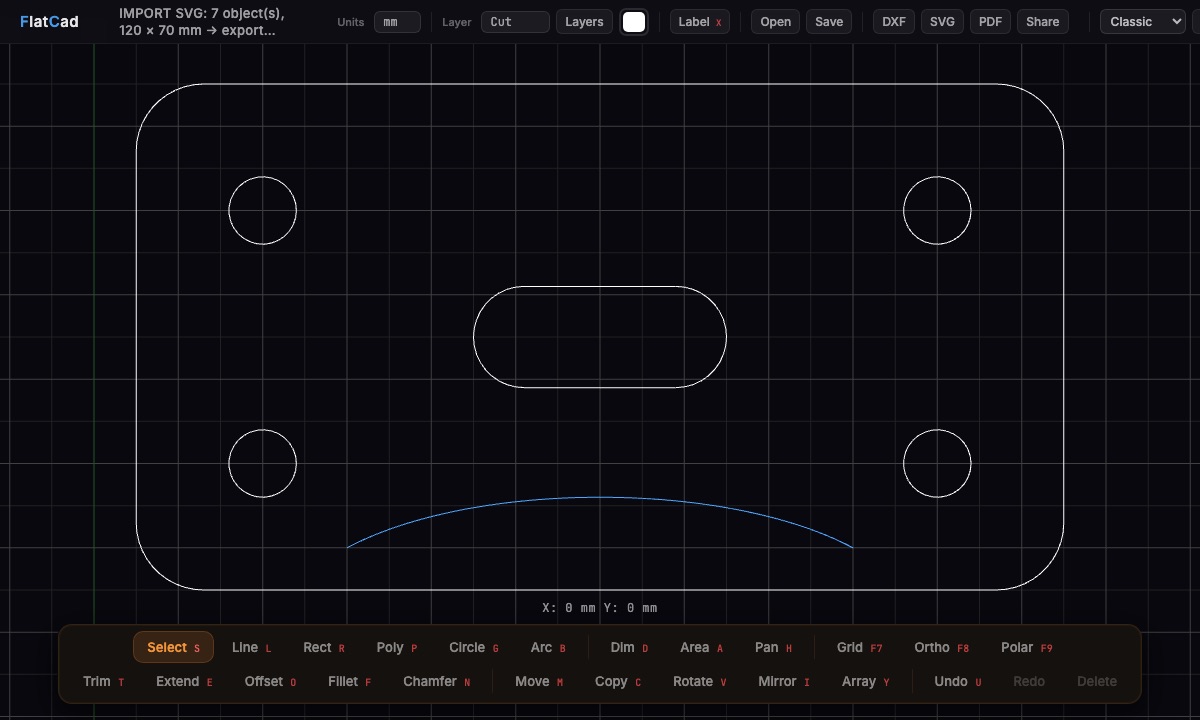
How to convert an SVG to DXF
Open the SVG. Go to flatcad.com, click Open (or press Ctrl+O), or simply drop the file on the canvas. Nothing is uploaded; your browser reads the file.
Check the size. The status line reports what came in, for example
IMPORT SVG: 7 object(s), 120 × 70 mm. Click any line or circle and the panel on the right shows its exact length, radius and position. If the size is off, select everything (Ctrl+A), press K for Scale, click a base point and type the factor, such as0.75or25.4.Tidy up if you need to. Trim, extend, fillet, offset for kerf, move parts onto the Cut, Engrave or Score layers. Inkscape layers arrive as FlatCad layers, so they come out as separate DXF layers too.
Export. Click DXF. You get an AutoCAD 2000 DXF with the units set, one layer per FlatCad layer, and touching lines and arcs joined into polylines, closed wherever the outline closes.
What stays an arc, and what becomes segments
| In the SVG | In the DXF |
|---|---|
<circle>, <ellipse> with equal radii | CIRCLE |
Rounded corners of <rect rx=…> | Arcs inside a closed LWPOLYLINE (bulges) |
Path arc commands (A/a) with a round radius | ARC, or bulges when joined to neighbours |
| Straight segments, polylines, polygons | LWPOLYLINE (closed when the outline closes) or LINE |
Bézier curves (C S Q T), true ellipses | Short straight segments, accurate to 0.01 mm |
<text> | TEXT, or single-line engraving strokes if you convert it first |
Arcs survive when the SVG isn't skewed or stretched unevenly. A circle that was squashed into an oval is an ellipse, so it becomes segments.
Why real arcs matter
- Smoother cuts. CAM software turns an arc into one smooth move (G2/G3). A circle made of 200 tiny lines becomes 200 moves, which can leave facets and slow the machine down.
- Holes are recognised as holes. CAM programs can pick out circles for drilling or pocketing, which they can't do with a polygon.
- Smaller, cleaner files. A DXF with arcs is a fraction of the size, and easy to edit later.
Units: the part that goes wrong most often
An SVG can be measured in millimetres, inches or pixels. FlatCad reads the real units from the file:
- Inkscape saves in mm by default, so it imports 1:1.
- SVGs in pixels are read at 96 per inch, the CSS standard that browsers and Inkscape use.
- Older Illustrator files use 72 pixels per inch. If a part measures 1.333 times too big, scale it by
0.75.
The DXF then declares its units ($INSUNITS), so programs that read the units header open it at the right size without asking.
Need the outline bigger or smaller by the width of the laser beam? See kerf offset for whole outlines, which also keeps arcs as arcs.
Questions
Is it free?
Yes. FlatCad is free with no signup, no watermark and no export limits.
Is my file uploaded anywhere?
No. The SVG is read by your browser and the DXF is written by your browser. Nothing is sent to a server.
Do circles and rounded corners stay as arcs?
Yes. Circles, rounded-rectangle corners and SVG arc commands with a round radius import as true arcs and export as DXF CIRCLE, ARC or polyline bulges. Bézier curves become short straight segments within 0.01 mm.
My part imported at the wrong size. Why?
An SVG measured in pixels is read at 96 pixels per inch, the web standard. Files from older Illustrator versions use 72, so they come in 1.333 times too big: select everything, press K for Scale and type 0.75. SVGs saved in millimetres (Inkscape's default) import at exactly 1:1.
Which DXF version does it write?
AutoCAD 2000 (AC1015), the version almost every CAD and CAM program reads, with the units header set, a layer table and handles. FlatCad's automated tests check every export with the independent ezdxf library, which reports no errors.
Does it work on a Chromebook?
Yes. FlatCad runs in any current browser with WebGL, including Chrome on ChromeOS, Edge, Firefox and Safari. After the first visit it also works offline.