Free CAD for laser cutting and CNC parts
FlatCad is a free 2D CAD program that runs in your browser. Draw a bracket, a plate, a sign or a box panel to exact dimensions, put cuts, engraves and scores on their own layers, and export a DXF or SVG your laser or CNC software opens at the right size. Nothing to install and no account.
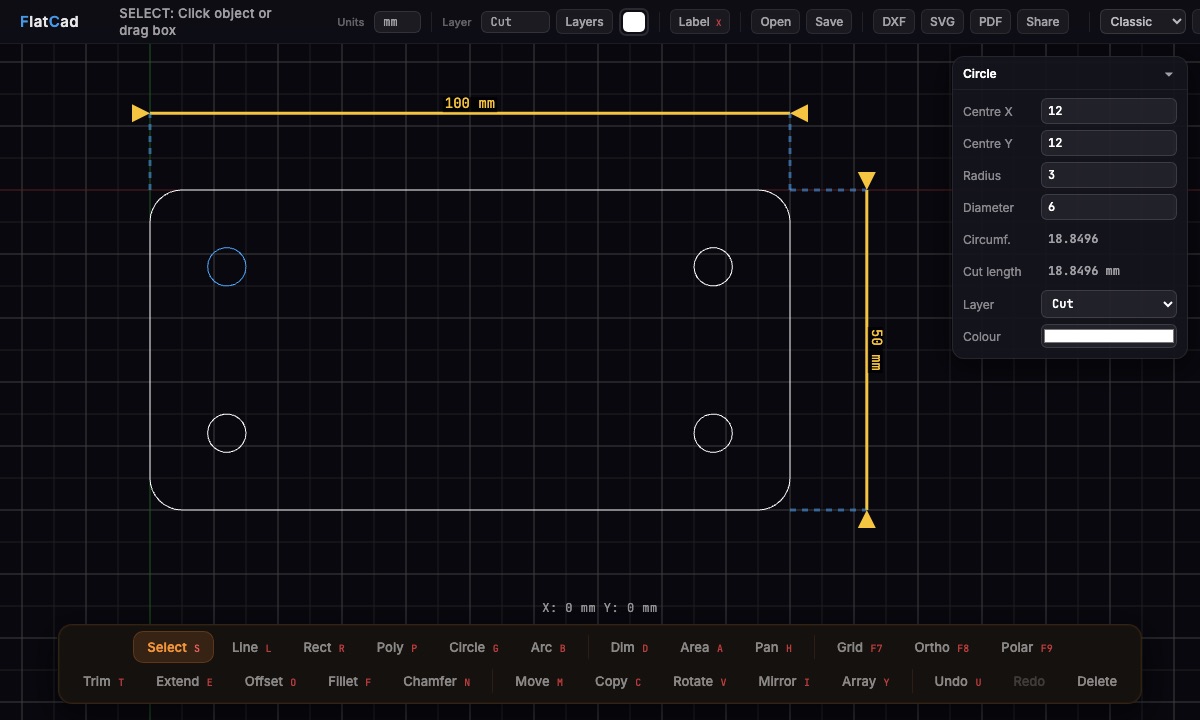
Draw a bracket in two minutes
Set millimetres. New drawings start in mm; the Units menu at the top also has cm, m, in and ft.
Draw the plate. Press R for Rectangle, click the first corner (press F7 first to snap to the grid), type
100,50and press Enter.Round the corners. Press F for Fillet, click the two edges at a corner, type
5and press Enter. Repeat for the other corners; Enter on its own reuses 5.Add the holes. Press G for Circle, click anywhere and type the radius
3. With the Select tool (S), click the circle and type its exact centre into the panel, for example12and12. Copy it (C) to the other corners using typed distances like@76,0.Check it. Select everything (Ctrl+A): the panel shows the total cut length, handy for estimating time and cost. Press D to add dimensions if you want a drawing to print.
Export. DXF for CAM and most laser software, SVG for laser software that prefers it. Each outline exports as one closed shape.
What's in the toolbox
| You want to | Use |
|---|---|
| Draw | Line, rectangle, polyline, circle, 3-point arc |
| Be exact | Typed lengths (100), coordinates (50,30), relative moves (@20,0), angles (100<45), arithmetic (100/3), and a properties panel |
| Snap | Ends, midpoints, centres, quadrants, intersections, tangents, perpendiculars, grid; ortho and polar tracking |
| Shape corners | Fillet (lines and arcs), chamfer |
| Edit | Trim, extend, offset (whole outlines, for kerf), move, copy, rotate, scale, mirror, rectangular and polar arrays |
| Organise for the laser | Cut, Engrave, Score and Guide layers, your own layers and colours |
| Engrave text | Labels, converted to single-line strokes when you need them |
| Bring files in | DXF (polylines with arcs, splines, blocks, text) and SVG, or drop them on the canvas |
| Send files out | DXF with true arcs and units, millimetre SVG, PDF at true scale, .flatcad files |
Laser software and layers
Most laser software assigns cut settings by colour or layer. FlatCad's layers have their own colours, and both exports keep them: the SVG has one group per layer with that layer's colour, and the DXF has named layers. Software that sorts by colour, LightBurn for example, then puts the Cut and Engrave parts on separate layers, ready for their own speed and power.
When to use something else
FlatCad is built for flat parts and 2D drawings. For 3D models, sheet-metal bends or constraint-driven sketches, use Onshape, Fusion 360 or FreeCAD. For artwork, photos and complex illustration, Inkscape or your laser software's own editor is the better fit; you can bring that SVG into FlatCad afterwards to dimension it or add kerf offsets.
Questions
Does it work with LightBurn, xTool, Glowforge or a CNC router?
FlatCad exports millimetre SVG with one group per layer, which LightBurn, xTool Creative Space and Glowforge open at the right size, and DXF for LightBurn, VCarve, Fusion 360 and other CAM software.
Is it really free?
Yes. No signup, no watermark, no export limits, no trial.
Can I use it offline or on a Chromebook?
Yes. It runs in any current browser with WebGL, Chromebooks included, and keeps working offline after the first visit. You can also install it as an app from the browser menu.
How do I save my work?
Your drawing autosaves in the browser. Save a .flatcad file with Ctrl+S to keep it anywhere or send it to someone.
Can it do 3D or parametric constraints?
No. FlatCad is for flat 2D parts and drawings. For 3D models or constraint-driven sketches, Onshape, Fusion 360 or FreeCAD are the right tools.
Can I engrave text?
Yes. Place a label, then use Text → single-line strokes in the panel to turn it into single-stroke lines that a laser or CNC can follow.